

Last week I started a FAQ series on reception lighting. This is SUCH a huge topic that I'm breaking it down into three sections. In this post I'm going to talk about leveraging your shutter speed. If what I wrote about using off-camera flash last week was a bit too much for you or you aren't interested in investing in the extra equipment required, this post will perhaps be a better place for you to start. And if you do incorporate off-camera flash into your reception lighting, you can also use this technique to make your photos even better. I know everyone is going to ask--so I'll tell you up front that all of the photos in this post were pre-off-camera flash days for me. These were all taken with a 580EX on camera, in ETTL mode with the flash pointed straight up and Gary Fong's lightsphere on top.
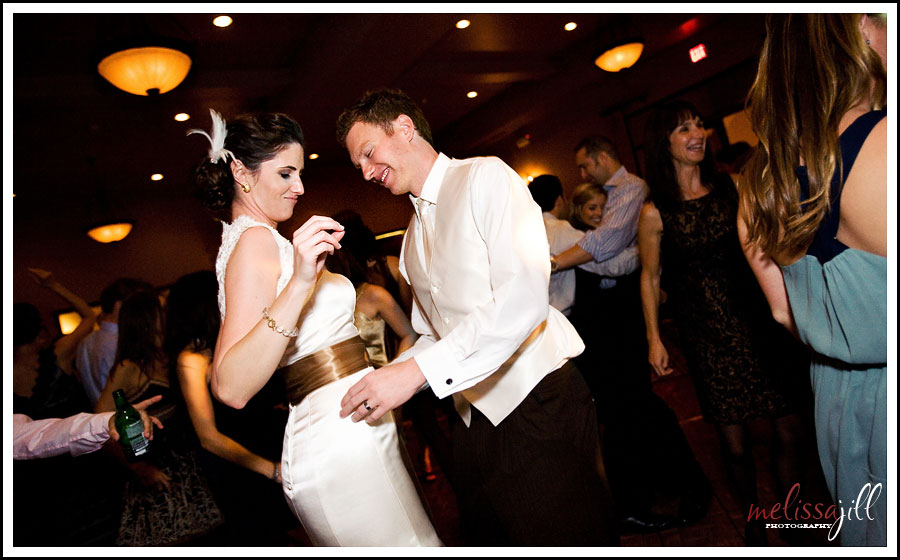
The one statement you need to understand in order to accept what I'm going to share here is this: Shutter speed does not affect flash exposure. If you are shooting in a very low-light situation where your flash is going to be your main light--which is the case at 99% of receptions--shutter speed does not affect the exposure of whatever your flash hits (the subject). The reason this is true, is that your flash fires at a speed much faster than the length of time that your shutter is open. So you can leave your shutter open for a minute, and as long as there isn't any other light hitting your subject than the flash, your exposure of the subject will be the same as it would if your shutter was only open for 1/100 of a second. If that doesn't make sense, it's ok. Just know that all of this translates into the effect that your flash freezes what it hits. You can therefore set your camera on a very low shutter speed when your flash is the main light. Whenever I'm in a reception hall and the lights are turned down, or I'm outdoors after sunset, I automatically set my shutter to 1/15 of a second. The top photo is in a very dark room. There is still some ambient (constant) light sources in the background and I wanted to pull that light into the shot to give it more depth. If I would have set my shutter speed at 1/100, everything behind the couple would be pretty much black. But I set it at 1/15 and shot away with no fear of blur because the flash has the effect of freezing whatever it hits. So shutter speed does not affect flash exposure but it does affect the exposure of ambient light.
I like to slow my shutter speed way down when using flash to increase the exposure of ambient light in my shots, but it's also fun to play with the combination of motion blur in the ambient light and the frozen action of the subject. In this next shot we were outside in the pitch darkness with only some twinkle lights in the surrounding trees. It was a beautiful atmosphere for a reception but a tough environment to shoot in. There were no surfaces off of which to bounce flash. So I set my shutter speed to 1/15 and as I pushed the shutter release, I spun the camera.
The one statement you need to understand in order to accept what I'm going to share here is this: Shutter speed does not affect flash exposure. If you are shooting in a very low-light situation where your flash is going to be your main light--which is the case at 99% of receptions--shutter speed does not affect the exposure of whatever your flash hits (the subject). The reason this is true, is that your flash fires at a speed much faster than the length of time that your shutter is open. So you can leave your shutter open for a minute, and as long as there isn't any other light hitting your subject than the flash, your exposure of the subject will be the same as it would if your shutter was only open for 1/100 of a second. If that doesn't make sense, it's ok. Just know that all of this translates into the effect that your flash freezes what it hits. You can therefore set your camera on a very low shutter speed when your flash is the main light. Whenever I'm in a reception hall and the lights are turned down, or I'm outdoors after sunset, I automatically set my shutter to 1/15 of a second. The top photo is in a very dark room. There is still some ambient (constant) light sources in the background and I wanted to pull that light into the shot to give it more depth. If I would have set my shutter speed at 1/100, everything behind the couple would be pretty much black. But I set it at 1/15 and shot away with no fear of blur because the flash has the effect of freezing whatever it hits. So shutter speed does not affect flash exposure but it does affect the exposure of ambient light.
I like to slow my shutter speed way down when using flash to increase the exposure of ambient light in my shots, but it's also fun to play with the combination of motion blur in the ambient light and the frozen action of the subject. In this next shot we were outside in the pitch darkness with only some twinkle lights in the surrounding trees. It was a beautiful atmosphere for a reception but a tough environment to shoot in. There were no surfaces off of which to bounce flash. So I set my shutter speed to 1/15 and as I pushed the shutter release, I spun the camera.

Here's an example of the same effect in a more brightly lit room:
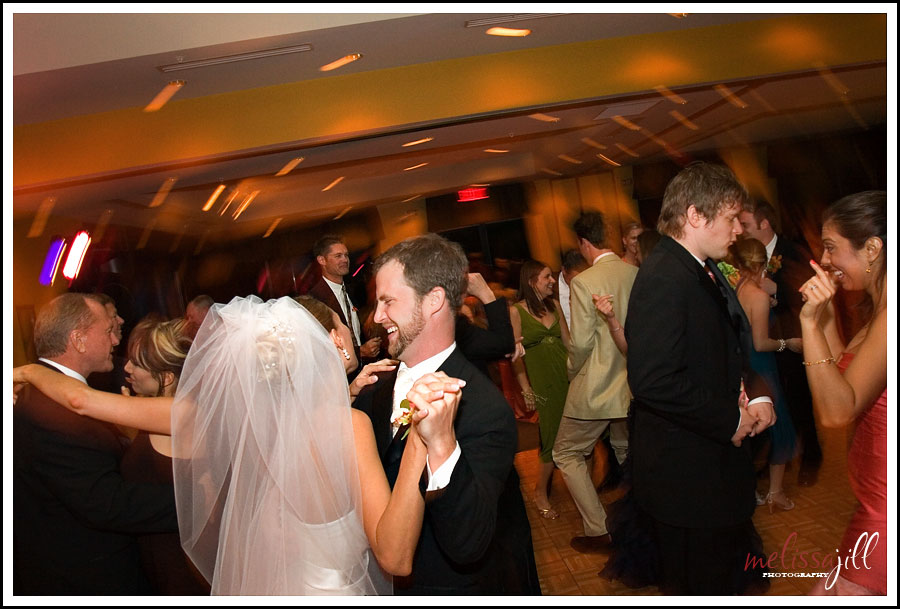
Ya, some of the people in the background are blurry, but who cares!? The couple is the main subject and they are sharp as a tack!
I took this shot so long ago that I can't remember for certain, but I believe I added a bit of a radial blur in Photoshop to increase the effect of the spin:
I took this shot so long ago that I can't remember for certain, but I believe I added a bit of a radial blur in Photoshop to increase the effect of the spin:
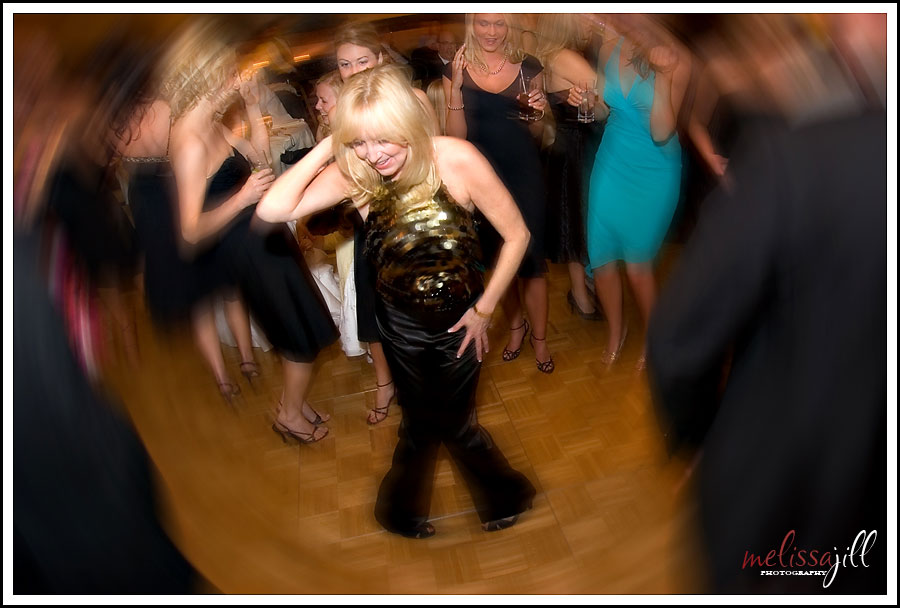
And here's one final shot--no spin this time but still a slow shutter speed. You can see the blurred lights in the background and even the onlookers aren't perfectly sharp, but I love the effect:
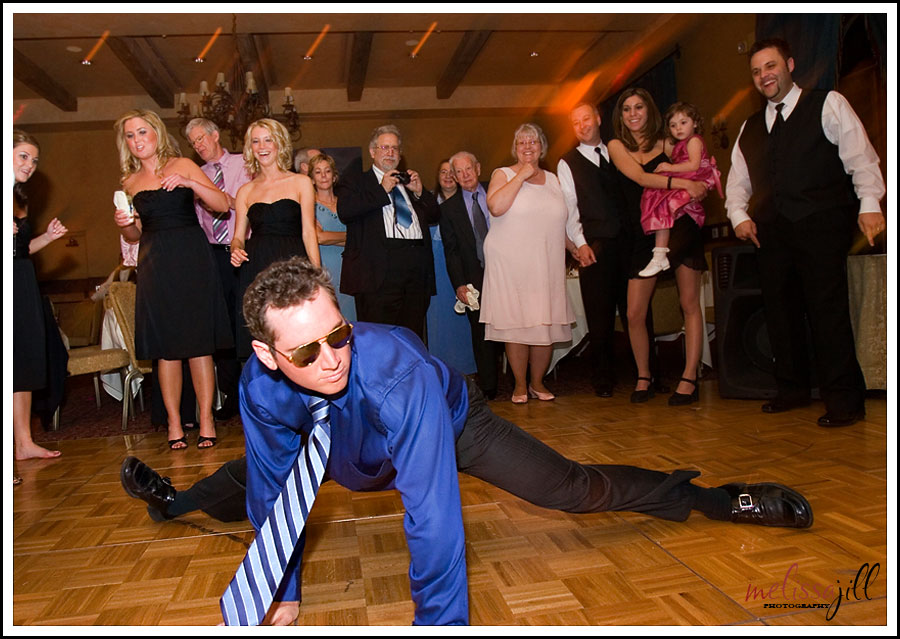
I love how purposefully moving your camera while taking a photo with slow shutter speed and flash can create motion in the shot. It's really a technique that is ideally suited to capturing the energy and celebratory environment of a wedding reception. So get out there and try it! Crank your shutter speed down to both increase ambient light in your reception shots as well as to play with the effects of motion in your images.
Stay tuned--next week I'll be finishing up this series by sharing a trick to help you focus in low light situations.
Stay tuned--next week I'll be finishing up this series by sharing a trick to help you focus in low light situations.
Comments


